Configuration
Configuration file
Docker way
Recommended: This is the recommended way.
The sqlite database file should be placed in /config.
Other ways
Warning: Docker is the recommended method.
Supported qlite database file locations:
/etc/seedboxsync/seedboxsync.db~/.config/seedboxsync/seedboxsync.db~/.seedboxsync/config/seedboxsync.db~/.seedboxsync.db
Settings
Notes:
- To avoid permission issues between your transfer account and your BitTorrent client account, SeedboxSync can chmod the torrent file after upload.
- To prevent your BitTorrent client from watching (and using) an incomplete torrent file, SeedboxSync first transfers the torrent file to a temporary directory (
tmp_path). Once the transfer and chmod are complete, the file is moved to the watch folder. The temporary folder must also be configured in your BitTorrent client for unfinished torrents.
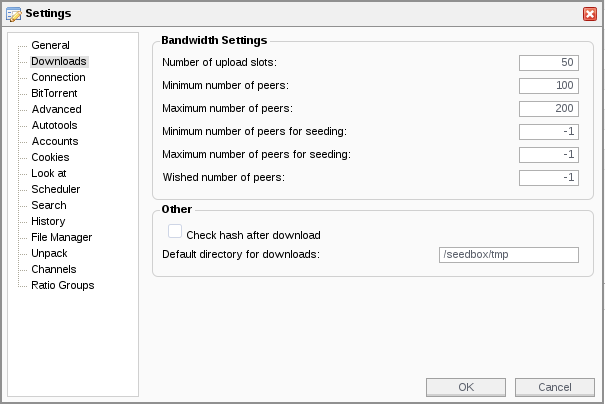
- The
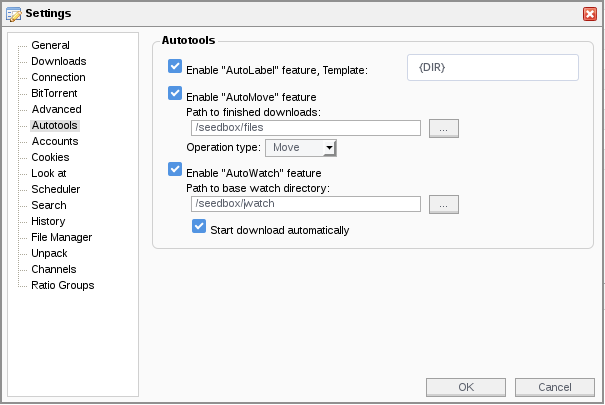
watch_pathis your BitTorrent client's "blackhole" or "watch" folder, used for blackhole synchronization. - The
finished_pathis the folder where your BitTorrent client moves completed downloads. You can configure your client to use a specific folder for finished files.
Ping service configuration
The ping service is triggered by the --ping argument.
Currently, only Healthchecks is supported.